Aswinkl71

Aswinkl71

Navbar

 <nav class="navbar navbar-expand-lg navbar-dark bg-dark fixed-top">

  <div class="container">
    <a class="navbar-brand" href="#">SopKart</a>
    <button class="navbar-toggler" type="button" data-bs-toggle="collapse" data-bs-target="#navbarNav"
      aria-controls="navbarNav" aria-expanded="false" aria-label="Toggle navigation">
      <span class="navbar-toggler-icon"></span>
    </button>
    <div class="collapse navbar-collapse" id="navbarNav">
      <div class="navbar-nav  ms-auto">
        <ul class="navbar-nav ">
          <li class="nav-item">
            <a class="nav-link active" aria-current="page" href="#"><i class="fa fa-home"></i>Home</a>
          </li>
          <li class="nav-item">
            <a class="nav-link" href=""><i class="fa fa-user"></i>Register</a>
          </li>
          <li class="nav-item">
            <a class="nav-link" href="#"><i class="fa fa-cubes"></i>Collections</a>
          </li>
          <li class="nav-item">
            <a class="nav-link" href="#"><i class="fa fa-shopping-cart"></i>Cart</a>

          </li>

        </ul>
      </div>
    </div>
  </div>
</nav>
at August 09, 2022 No comments:
Email ThisBlogThis!Share to XShare to FacebookShare to Pinterest

How to connect MySQL to Django


 DATABASES = {

    'default': {
        'ENGINE': 'django.db.backends.mysql',
        'NAME': 'shopok',
        'HOST':'localhost',
        'USER':'root',
        'PASSWORD':'aswin',
        'PORT':'3306',
    }
}
at August 09, 2022 No comments:
Email ThisBlogThis!Share to XShare to FacebookShare to Pinterest

c programing star printing

1.

_______


* * * * *

* * * * *

* * * * *

* * * * *

* * * * *


answer: 


       #include <stdio.h>

       #include <stdio.h>


         int main() {

         int n,i,j;

            printf("enter a number\n= ");

            scanf("%d",&n);

            for(i=0;i<n;i++){

            printf("\n");

            for(j=0;j<n;j++){

            printf("* ");

            }

            }


            return 0;

            }


2.


 *

 * *

 * * *

 * * * *

 * * * * *

answer:

      #include <stdio.h>

      #include <stdio.h>


         int main() {

         int n,i,j;

            printf("enter a number\n= ");

            scanf("%d",&n);

            for(i=1;i<=n;i++){

            printf("\n");

            for(j=1;j<=i;j++){

            printf("* ");

            }

            }


            return 0;

            }


3.


* * * * *

* * * *

* * *

* *

*


answer: 


    #include <stdio.h>

    #include <stdio.h>


         int main() {

         int n,i,j;

            printf("enter a number\n= ");

            scanf("%d",&n);

            for(i=n;i>=1;i--){

            printf("\n");

            for(j=1;j<=i;j++){

            printf("* ");

            }

            }


            return 0;

            }


at May 31, 2022 No comments:
Email ThisBlogThis!Share to XShare to FacebookShare to Pinterest

JavaScript


////////JavaScript Data Types////////////
let NAME = 'ASWIN';            ///String  
console.log(NAME);             ///String
//////////////////////////////////////////
let NUMBER = 18;               ///Number
console.log(NUMBER);           ///Number
//////////////////////////////////////////
let AS = {FIRST:'ASWIN', LAST:'B'}//Object
console.log(AS);              ///Object
//////////////////////////////////////////
let NOVALUE = null;           ///null
 console.log (NOVALUE);       //null      
 ////////////////////////////////////////
 let Boolean =false;         ///Boolean
console.log(Boolean);       ///Boolean
/////////////////////////////////////////
let C =['aswin','appu','hello']; ///Array
console.log(C);                  //Array
///////////////////////////////////////////


strings common methods
------------------------------
////length////
let a = 'aswin';
console.log(a.length);
////////////////////
console.log(a.toUpperCase(a));
////////////////////////////
console.log(a.toLowerCase(a));
//////////////////////////////
console.log(a.replace('as','af'));
////////////////////////////////
console.log(a.slice(2,3));
-------------------------------------
loops

//while loop
var num = 0;
while(num < 10){
    num +=1;
       console.log(num);
}


//for loop

 for (let num = 0; num < 100; num++) {
   
   console.log(num);
 }

how to we add 2 numbers together in fuction javascript
------------------------------------------------------

 function num(n1,n2){

     var result = n1+n1;
     console.log(result);

   
}
num(10,10);


at March 30, 2022 No comments:
Email ThisBlogThis!Share to XShare to FacebookShare to Pinterest

loop for while


//while loop
var num = 0;
while(num < 10){
    num +=1;
       console.log(num);
}


//for loop

 for (let num = 0; num < 100; num++) {
   
   console.log(num);
 }

at March 30, 2022 No comments:
Email ThisBlogThis!Share to XShare to FacebookShare to Pinterest

how to we add 2 numbers together in fuction javascript

 function num(n1,n2){

     var result = n1+n1;
     console.log(result);

   
}
num(10,10);
at March 30, 2022 No comments:
Email ThisBlogThis!Share to XShare to FacebookShare to Pinterest

javascript prompt

 1.  <!DOCTYPE html>

<html lang="en">
<head>
    <meta charset="UTF-8">
    <meta http-equiv="X-UA-Compatible" content="IE=edge">
    <meta name="viewport" content="width=device-width, initial-scale=1.0">
    <title>Document</title>
</head>
<body>
    <h1   style="color: blue; background-color: black;" id="s">HELLO</h1>
 
       
   <script src="index.js"></script>
</body>
</
html>


1.javascript
function fun(){
  var name =  prompt('what is your name');
  var result = 'hello ' + '' + name;
  console.log(result);
  document.getElementById('s').innerHTML = result;
}
fun();


at March 30, 2022 No comments:
Email ThisBlogThis!Share to XShare to FacebookShare to Pinterest

free website templates


website templates free click me

at March 22, 2022 No comments:
Email ThisBlogThis!Share to XShare to FacebookShare to Pinterest

Responsive Navigation Menu Bar using HTML CSS & JavaScript

Step 1

. create index.html
.next create index.css

Step 2
Create index.html
.<!DOCTYPE html>
<html lang="en">
<head>
    <meta charset="UTF-8">
    <meta http-equiv="X-UA-Compatible" content="IE=edge">
    <meta name="viewport" content="width=device-width, initial-scale=1.0">
    <link rel="stylesheet" href="index.css">
    <title>Responsive nave bar</title>
</head>
<body>
    <!------nav tags-->
    <nav>
        <label class="logo">Aswinkl71</label>
        <!----ul tags-->
        <ul>
            <li><a href="#">Home</a></li>
            <li><a href="#">About</a></li>
            <li><a href="#">Contact</a></li>
        </ul>
        <!----ul tags-->
    </nav>
    <!------nav tags-->
</body>
</html>


.next step create index.css
*{ padding:0;
     margin:0:
     text-decoration:none;
     list-style:none:}

.next step
body {
  font-family:monsterrat:
}
nav{ width:100%;
          height:80px;
         background:#34495e;
}
.next step
.logo{
  font-size: 35px;
  font-weight: bold;
  color: white;
  padding: 0 100px;
  line-height: 80px;
}

.next step home, about, contact right side

nav ul{
  float: right;
  margin-right:40px
}

.next step home, about , contact same line
nav li {
  display: inline-block;
margin: 0 8px;
  line-height: 80px;
}
. next step

nav a{
  color: white;
  font-size: 18px;
  text-transform: uppercase;
  border: 1px solid transparent;
  padding: 7px 10px;
  border-radius: 3px;

}

.next step
Go to your index.html file <li><a class="active" href="#">Home</a></li>
add a class name on li,a tags"active" iam create class name

.Next on css file

a.active,a:hover{
  border: 1px solid white;
  transition: .5s;
}


at March 13, 2022 No comments:
Email ThisBlogThis!Share to XShare to FacebookShare to Pinterest

hacking videos

1.>dvwa

2.>Website Admin Panel Finder Login Page 2021 Linux

3.>What Is Cross-Site Request Forgery (CSRF)


4.>SQL injection

 
5.>Install Kali Linux on Windows 10 Malayalam [Tutorial
 
6.> Track_anyone's_location_using_seeker_Kali_linux_hacking_tricks_Malayalam

 
7.>what is no rate limit bug
 
8.>How to Crack ZIP File Password [2021


9.>What is an HTML injection attack Malayalam
10.>What is Social Engineering Toolkit in Kali Linux 


11.>what is Broken link Hijacking

12.>termux instagram hacking
13.>wp scan


at October 26, 2021 No comments:
Email ThisBlogThis!Share to XShare to FacebookShare to Pinterest

No Rate Limit bug


at October 24, 2021 No comments:
Email ThisBlogThis!Share to XShare to FacebookShare to Pinterest

How to crack zip password on Kali Linux - Linux Tutorial


at October 24, 2021 No comments:
Email ThisBlogThis!Share to XShare to FacebookShare to Pinterest

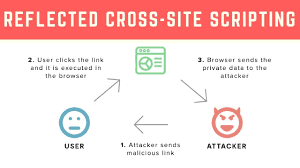
Reflected XSS


 Reflected XSS


at October 24, 2021 No comments:
Email ThisBlogThis!Share to XShare to FacebookShare to Pinterest

XSSRecon - Reflected XSS Scanner


XSSRecon - Reflected XSS Scanner


  • Scans a website for reflected Cross-Site-Scripting
  • Zero false positives, its using a real browser checking for the popups
  • Automatic out-of-scope checking (experimental, but works very well yet)
  • Uses Python 3.7 with selenium / chromedriver
  • Crawler or single URL scanner
  • Configurable:
    --target | Target to scan
    --crawl | Activate crawler
    --wordlist | Wordlist to use
    --delay | Delay between requests
    --visible | Visible browser for debugging (chromedriver)
    --silent | Only print when vulns have been found


at October 24, 2021 No comments:
Email ThisBlogThis!Share to XShare to FacebookShare to Pinterest

Aswinkl71


at October 24, 2021 No comments:
Email ThisBlogThis!Share to XShare to FacebookShare to Pinterest

Essl

Essl click me Essl
at September 29, 2021 No comments:
Email ThisBlogThis!Share to XShare to FacebookShare to Pinterest

Metasploit


Metasploit 

at November 05, 2020 No comments:
Email ThisBlogThis!Share to XShare to FacebookShare to Pinterest

DDoS attacks


at October 28, 2020 No comments:
Email ThisBlogThis!Share to XShare to FacebookShare to Pinterest

avast Premier Antivirus 2020


avast Premier Antivirus 2020 Technical Setup Details

  • Software Full Name: avast Premier Antivirus 2020
  • Setup File Name: Avast.PR.19.8.2393.rar
  • Full Setup Size: 371 MB
  • Setup Type: Offline Installer / Full Standalone Setup
  • Compatibility Architecture: 32 Bit (x86) / 64 Bit (x64)
  • Latest Version Release Added On: 24th Feb 2020
  • Developers: avast

System Requirements For avast Premier Antivirus 2020

Before you start avast Premier Antivirus 2020 free download, make sure your PC meets minimum system requirements.

  • Operating System: Windows 7/8/8.1/10
  • Memory (RAM): 1 GB of RAM required.
  • Hard Disk Space: 500 MB of free space required.
  • Processor: Intel Dual Core processor or later.
  • avast Premier Antivirus 2020 Free Download

    avast Premier Antivirus 2020 Free Download

at October 11, 2020 No comments:
Email ThisBlogThis!Share to XShare to FacebookShare to Pinterest

Kaspersky Total Security 2021 Free Download


Features of Kaspersky Total Security 2021

Below are some noticeable features which you’ll experience after Kaspersky Total Security 2021 free download.

  • Protections and security.
  • Simple and easy to use.
  • Powerful and advanced.
  • Scans all files and folders.
  • Total secure environment.
  • Block suspicious applications.

Kaspersky Total Security 2021 2021-free-downloadFree Download

at October 11, 2020 No comments:
Email ThisBlogThis!Share to XShare to FacebookShare to Pinterest
Newer Posts Older Posts Home
Subscribe to: Comments (Atom)

Aswinkl71

Navbar

  < nav class = "navbar navbar-expand-lg navbar-dark bg-dark fixed-top" >   < div class = "container" >   ...

  • AN Whatsapp
     For free download= AN Whatsapp
  • Parrot Os
      Parrot OS, the flagship product of Parrot Security is a GNU/Linux distribution based ... Software Genre :  Linux  CLICK TO DOWNLOAD CLICK ...
  • c programing star printing
    1. _______ * * * * * * * * * * * * * * * * * * * * * * * * * answer:                  #include <stdio.h>        #include <stdio.h...

Aswinkl71

My photo
HACKING TRICKS
View my complete profile

ALL POST

Report Abuse

KL_71 TECH BOY

KL_71 TECH BOY

KL_71 TECH BOY

Index

Aswinkl71

Hello iam aswin........

HACKING TRICKS

π™½π™Ύπ™±π™Ύπ™³πšˆ 𝙲𝙰𝙽 π™Άπ™Έπš…π™΄ πšˆπ™Ύπš„ π™΅πšπ™΄π™΄π™³π™Ύπ™Ό π™½π™Ύπ™±π™Ύπ™³πšˆ 𝙲𝙰𝙽 π™Άπ™Έπš…π™΄ πšˆπ™Ύπš„ π™΄πš€πš„π™°π™»π™Έπšƒπšˆ π™Ύπš π™Ήπš„πš‚πšƒπ™Έπ™²π™΄ 𝙸𝙡 πšˆπ™Ύπš„ π™°πšπ™΄ 𝙰 𝙼𝙰𝙽 πšƒπ™°π™Ίπ™΄ π™Έπšƒ‼️
"𝐈 π‹πˆπ•π„ 𝐀 ππ‘π„π“π“π˜ π€ππŽππ˜πŒπŽπ”π’ π‹πˆπ…π„"

Pages

  • Home

Followers

Hacking tricks.yt

Hacking tricks.yt
YOUTUBE

Total Pageviews

Translate

Hacking

  • hacking tricks_yt - YouTube

Followers

Hacking tricks .yt

Posts
Atom
Posts
All Comments
Atom
All Comments

Whatsapp 7025386182

Name

Email *

Message *

Aswinkl71

Aswinkl71

Hacking tricks

  • ▼  2022 (9)
    • ▼  August 2022 (2)
      • Navbar
      • How to connect MySQL to Django
    • ►  May 2022 (1)
    • ►  March 2022 (6)
  • ►  2021 (7)
    • ►  October 2021 (6)
    • ►  September 2021 (1)
  • ►  2020 (45)
    • ►  November 2020 (1)
    • ►  October 2020 (5)
    • ►  September 2020 (5)
    • ►  August 2020 (34)

Aswinkl71

Search This Blog

YOUTUBE

  • YOUTUBE
KL_71 TECH BOY. Watermark theme. Powered by Blogger.